Best Laptop Maintenance Tips to Make Your Laptop Last Longer
A laptop is not something you should use anyhow. Whether you use it for school, business, office work, gaming, or online meetings, proper maintenance can help it last longer and perform better. Many laptop problems do not happen suddenly; they often start from poor handling, overheating, dust, weak battery habits, and lack of regular care.
Here are simple but effective laptop maintenance tips to help your laptop stay in good condition for a long time.
1. Keep Your Laptop Clean
Dust and dirt can block your laptop’s air vents and make it overheat. Use a soft microfiber cloth to clean the screen, keyboard, and body of the laptop. Do not pour water directly on your laptop. If you need to clean stubborn stains, lightly dampen the cloth, then wipe gently.
Also, avoid eating directly over your laptop. Food particles can enter the keyboard and attract insects or damage the keys.
2. Avoid Overheating
Heat is one of the biggest enemies of any laptop. When your laptop overheats often, it can damage the battery, processor, motherboard, and internal components.
Always use your laptop on a flat surface like a table. Avoid placing it on beds, pillows, or thick fabrics because they can block the air vents. If your laptop gets hot quickly, consider using a cooling pad.
3. Charge Your Battery Properly
Poor charging habits can reduce your battery life. Do not always allow your battery to drain completely before charging. Also, avoid leaving your laptop plugged in all the time if it gets too hot while charging.
A good habit is to keep the battery between about 20% and 80% when possible. If your laptop has a battery care mode, enable it.
4. Shut Down or Restart Regularly
Some people leave their laptop on for days without restarting it. This can slow down performance and cause unnecessary background processes to build up.
Restart your laptop regularly to refresh the system. Also, shut it down properly when you are not using it for a long time. Do not just close the lid every time and forget it.
5. Update Your Software
Software updates are important because they fix bugs, improve security, and help your laptop run smoothly. Make sure your operating system, drivers, antivirus, and important apps are updated.
However, avoid downloading updates or software from unknown websites. Use official sources only.
6. Use Antivirus Protection
Viruses and malware can slow down your laptop, damage files, steal personal information, or even make the system crash. Install a reliable antivirus and scan your laptop regularly.
Also, avoid clicking suspicious links, downloading cracked software, or opening unknown email attachments.
7. Handle Your Laptop Carefully
Do not carry your laptop by the screen. Always hold it from the base. Avoid dropping it, pressing heavy objects on it, or putting it inside a bag without proper protection.
Use a laptop bag with padding, especially if you move around often. Physical damage is one of the most expensive laptop problems to repair.
8. Keep Liquids Away
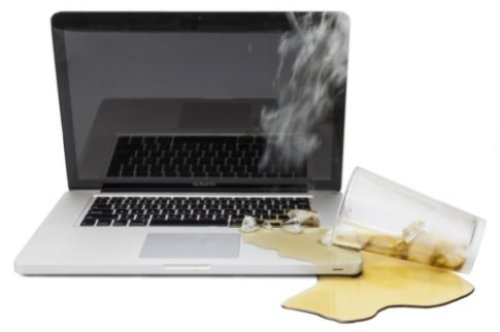
Water, tea, juice, and soft drinks can damage your laptop instantly. One small spill can affect the keyboard, motherboard, or screen.
If liquid accidentally spills on your laptop, switch it off immediately, unplug the charger, and take it to a technician. Do not keep pressing buttons or trying to use it.
9. Free Up Storage Space
When your laptop storage is almost full, it may become slow. Delete files you no longer need, uninstall unused apps, and move large files like videos and photos to an external drive or cloud storage.
Try to keep enough free space on your main drive so your laptop can run smoothly.
10. Service Your Laptop When Needed
If your laptop is overheating, making strange noise, shutting down unexpectedly, or running very slowly, do not ignore it. Take it to a trusted technician for proper checking.
Routine servicing can include cleaning the fan, changing thermal paste, checking the battery, and removing dust from inside the laptop.
Conclusion
Taking care of your laptop is not difficult. Small habits like keeping it clean, avoiding heat, charging properly, updating software, and protecting it from damage can make a big difference. A well-maintained laptop will last longer, work faster, and save you money on repairs.
Treat your laptop like an important investment, and it will serve you better for years.